

Your selected option matches the expected answer. Full marks awarded (1.0/1.0).For millions of students, professionals, and immigrants, high-stakes English exams are the ultimate gateway to higher education, professional licensing, and visa approval. The ability to take tests from the comfort of one’s home was a welcome relief. However, the new PTE Academic at Home and IELTS Online examinations require candidates to navigate through multiple layers of cutting-edge security measures.
Both tests employ sophisticated technology to protect the integrity of their scores, yet there are enough subtle differences in software and room regulations that could lead to devastating cancellations of scores for unsuspecting candidates.
In this article, we will review the technical and proctoring regulations of PTE Academic and IELTS online examinations. Specifically, we will discuss the technology that enables cheating prevention, review the most common causes of unauthorized interruption of tests, and analyze the shift toward the new standard in secure online proctoring.
1. Head-to-Head Comparison: Operational & Room Rules
While both exams evaluate similar core language skills (reading, writing, listening, and speaking), their technical setups and proctoring environments operate under distinct operational rules.
Feature / Rule | PTE Academic at Home | IELTS Online |
Primary Invigilation Model | Automated AI Monitoring + On-Demand Human Review | Live Human Invigilator (1-to-Many Ratio) + AI Behavioral Tracking |
Speaking Section Architecture | Integrated AI Speech Engine (Built-in laptop mic required; headsets usually prohibited) | Live 1-on-1 Video Interview with a Certified Human Examiner |
Physical Notes & Scratch Paper | Strictly Prohibited (No pen, paper, or physical whiteboards allowed) | Strictly Prohibited (No physical paper or notes permitted during testing) |
System Lockdown Mechanism | OnVUE Secure Browser (Windows / macOS) | Inspera Assessment / IELTS LockDown Browser |
Pre-Exam Room Scan | 360° Automated Webcam Scan via smartphone or webcam prior to launch | 360° Live Room Inspection guided by a live invigilator |
Break Protocol | Not permitted (Leaving webcam view invalidates the assessment) | Not permitted during active testing modules |
2. The Anti-Cheating Security Stack: How Fraud Is Detected
Both Pearson VUE (for PTE) and IELTS Online deploy multi-layered security stacks designed to catch impersonation, unauthorized digital aids, and physical environment tampering.
System & Operating System Lockdown
Both testing environments mandate dedicated lockdown browsers to prevent software bypasses. Many candidates wonder why simple web extensions aren't used for high-stakes testing, but as detailed in the analysis on why Chrome extension proctoring fails, browser extensions lack root privileges. Native secure applications execute true process isolation, disabling shortcuts (blocking background screen-recording processes), disabling virtual machine drivers, and blocking secondary displays connected via physical hardware or display splitters.
Biometric Identity Verification
Before entering the exam environment, candidates undergo identity verification:
Liveness Detection & Face Matching: Compares the candidate’s live facial capture against their passport photo to stop proxy test-takers.
Document OCR: Scans foreign passports and government-issued IDs in real time to verify document authenticity.
Behavioral AI & Acoustic Monitoring
While performing the test, computer vision algorithms analyze the landmarks of the examinee’s face to determine the location of his/her gaze or slightly rotated head. At the same time, some other software is utilized to detect any unusual sounds, which could indicate the presence of other voices giving secret hints to the examinee.
3. Common Pitfalls That Trigger False Flags (And How to Avoid Them)
Many candidates whose scores are placed under review or withheld are not attempting to cheat. Instead, they fall prey to technical or behavioral triggers that computer vision models flag as anomalies.
1. Whispering or Articulating Words During Reading Tasks
Non-native English-speaking individuals may be likely to move their lips when reading or speaking complex text. At the same time, such individuals may also be more inclined to speak quietly or even whisper while doing so. In legacy automated AI systems, combining this behavior with near-silent utterances may be misconstrued by the computer as communicating with an unseen human agent.
2. Off-Screen Gaze Shifts During Cognitive Tasks
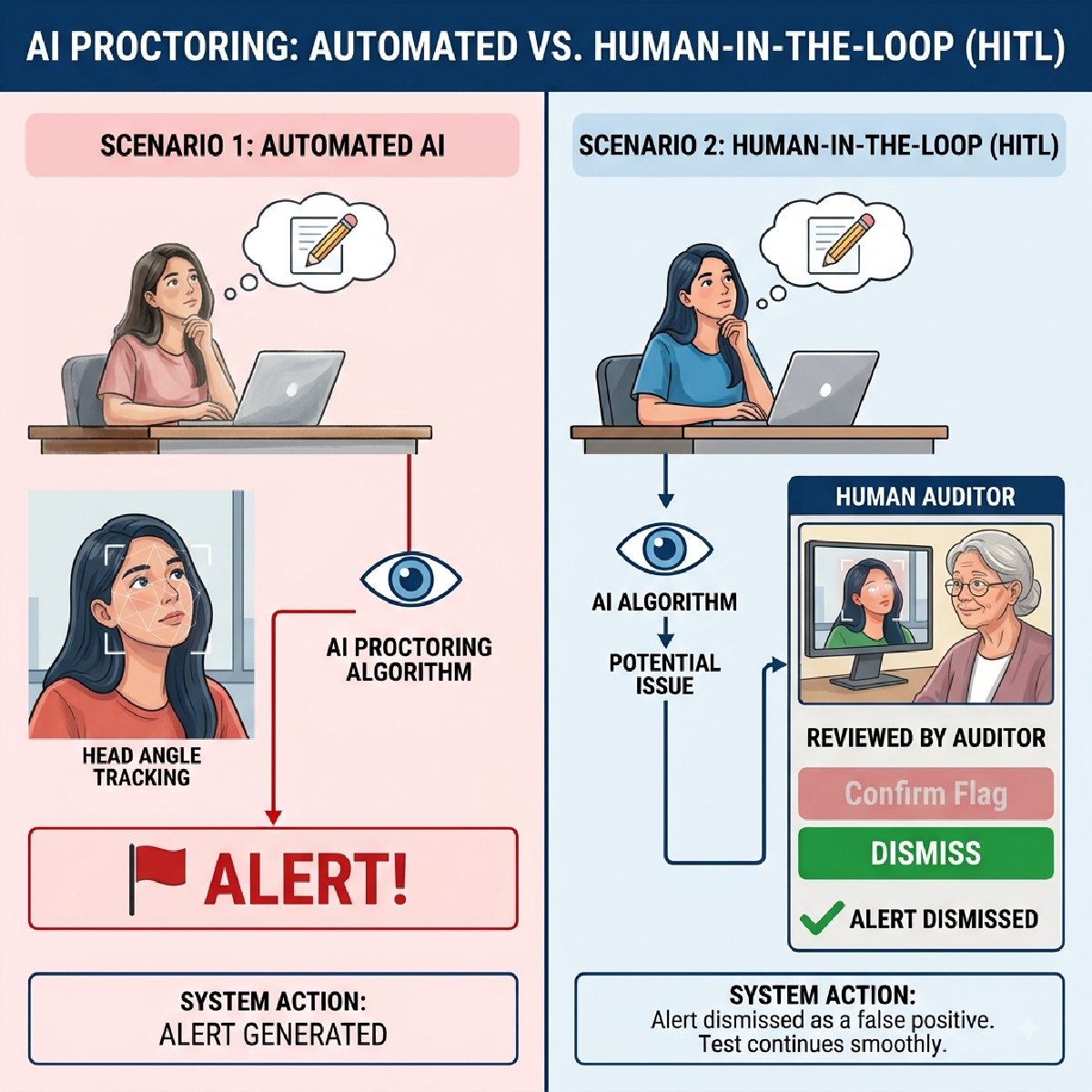
When forming ideas for speaking or an essay, looking at the ceiling or out the window is a natural human action. However, a computer monitoring the subject's eye movement would register a significant amount of time looking at anything other than the designated screen or camera as time spent looking elsewhere, which could potentially fail the subject based on these criteria.
3. Lighting Shifts and Shadows
A sudden change in room lighting due to a cloud passing over the sun or the display on a laptop changing its brightness can cause the computer vision algorithm to lose track of the facial landmarks, resulting in a "candidate missing" error message.
4. What Other Guides Miss: The "Language Bias" in Algorithmic Monitoring
Standard instructions for candidates only specify the rules but do not explain why applicants with a foreign language heritage are more likely to trigger suspicion among software algorithms for the advanced English language test.
The stress of scanning through a non-native language text within a short period of time produces specific tells that can only be associated with inadequate proficiency. The actions that demonstrate the strain include:
Reading slower than native proficiency dictates but tracking the eye movements down the lines;
Speaking out loud to read the phonetics in the foreign language;
Looking away from the text to translate the words or phrases in the head.
Understanding the specific mechanics of your target test is critical; for instance, choosing between Pearson formats like PTE Core vs. PTE Academic differences changes not only the question style (everyday scenarios vs. academic lectures) but also the writing cognitive load, directly influencing how a candidate naturally behaves on camera.
5. The Move Toward Fairer Testing: Hybrid Proctoring
To fix the issue of innocent candidates facing cancelled scores over harmless habits, modern assessment platforms are moving away from pure automation in favor of a balanced approach.
As explored in depth in our breakdown of AI vs. human proctoring and why the hybrid model wins, pure AI can be overly rigid, while pure human invigilation is difficult to scale. Modern assessment platforms combine both:
Automated AI Screening: Handles real-time telemetry processing across video, audio, and OS layers at scale.
Human-in-the-Loop Review: Flagged video snippets are audited by trained human reviewers who evaluate context before any action is taken.
When an acoustic engine picks up low mumbling or a camera detects a gaze shift, human reviewers quickly determine whether it is a candidate silently processing an essay question or genuine assistance. This hybrid approach eliminates false flags while maintaining strict security for high-stakes evaluations.
Summary Checklist for Test Day
To ensure a smooth exam experience without technical interruptions or flagged sessions:
Clear Your Space: Remove all physical paper, pens, secondary devices, and loose cables from your desk area.
Fix Your Lighting: Ensure your main light source is in front of you (behind your monitor) rather than behind your chair to prevent backlighting shadows.
Control Speech Habits: Keep your mouth still during silent reading sections and refrain from reading questions out loud.
Maintain Screen Focus: Keep your gaze centered on the screen, particularly during thought-heavy writing or speaking tasks.
Disable Background Systems: Ensure all unneeded applications, virtual drivers, and system updates are completely closed before opening the lockdown browser.
Ready to master your at-home language prep?
Understanding the rules and security protocols is the best way to walk into exam day confident, relaxed, and fully prepared. To practice under realistic exam conditions, take authentic mock tests, and get familiar with modern online proctoring environments, head over to languageprep.proctorplus.io.